

Last time I posted, I covered old-fashioned and modern tools that paranormal investigators use when visiting supposedly haunted locations. As I said I would, I have trialled a few iPhone apps that claim to detect presences and enable the layperson to communicate with entities from the “other side.”
To start with I used the apps in the peace and quiet of my hopefully not-haunted flat (which is situated in a building that was first constructed in the 1500s, so ehhh…) Then I repaired to my local graveyard to test them out once more, looking for similarities and differences.
I have grouped the apps into three areas: scanning, communicating, and multiple functions.
Scanning Apps
Paranormal EMF Recorder and Scanner
5 out of 5 stars
This app (like other good EMF-reading apps) uses the magnetometer sensor in your phone to transform it into an EMF meter. It’s free to use and you can record the EMF measurements to analyse them later.
Recording can be undertaken with or without the scanning sound effect.
During analysis, you can swipe and zoom through diagrams of the recorded EMF results and the data is saved in .csv format, which is a common file format used in spreadsheet programmes like Excel.
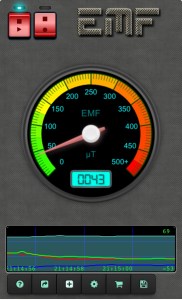
The app description recommended that I test the scanner near magnets and devices which emanate EMFs, such as microwaves and TV screens, so that is the first thing I did with every app I tried.
For anyone who wants to know — the Earth’s natural magnetic field ranges from 25 to 65 microTesla, depending on where you are.
Baseline readings in my flat were around 30 – 48 microTesla.
My experience:
This app does pick up on EMFs generated by electronic appliances, particularly my refrigerator, which spiked the reading to over 200. Surprisingly, my fascia massage gun [in its box and switched off] sent the reading skyrocketing up to 500. Not sure what to think of that!
In the churchyard, the baseline reading was 47 – 52 microTesla. I ambled all the way around the churchyard and the app detected no spikes in EMF.
Ghost Radar Legacy
2 out of 5 stars
My experience:
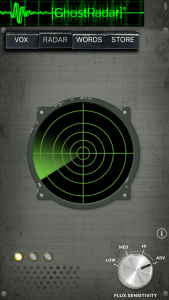
On opening this app at home, a robotic voice “spoke” five times, saying words that didn’t make sense with each other. I sat still and didn’t talk or make any sound, just letting it do its thing. It said, “Alive. Understanding. Handle. Cat. Length” then after a few minutes a blip showed up on the “radar” and the same voice said “Organisation.” A reference to my flat needing a tidy-up, perhaps?
According to the app’s FAQ, “When the radar first starts it will be very sensitive to the noise in your environment perhaps giving false readings. After several minutes of self adjustment the radar will learn how to filter out the noise. The longer the radar is allowed to run the more sensitive it becomes to anomalous readings.” There was no noise in my surroundings.
Ghost Radar doesn’t measure EMFs, or gravity, but disturbances in something that it called the “Quantum Flux” or quantum fluctuations surrounding your device. (Sounds like something from the Back to the Future movie franchise…). The app “employs a proprietary algorithm to analyse readings from the device” and displays them as blips on the radar and numbers / text.
You can alter the sensitivity of the “radar” using the sensitivity knob – a radar that the app admits has an unknown range and measures things from above and below the phone as well as on the horizontal plane.
How it supposedly works is that “intelligent entities” can be made aware they can influence the readings:
“It’s believed that paranormal energies have the ability to influence electrical equipment. This idea comes from the concept that matter, life, souls, and light are fundamentally an electrical phenomenon. As a result the app uses streams of data from processing units and memory locations as the raw mechanism for paranormal energies to manipulate.” [from the app’s FAQ section].
There is also a feature where you can use the app like a flashlight in dark environments.
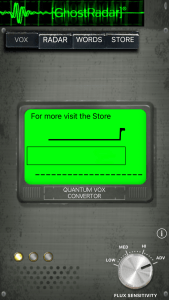
In the churchyard, this app detected a couple of red (or “strong”) presences — one close to the church entrance for a second and one that lasted for a longer time close to the side of the church. No words were spoken for a long time, until the voice said “of,” which seemed to be triggered by the sound of a kid going past me on a scooter.
But then “gently,” “are” and “fastened” were said close to one of the church’s old-fashioned side doors. Another couple of brief red presences were detected just ahead of me at a fork in the path, which then moved behind me briefly before vanishing off the radar.
“Try,” and “driven” were uttered just as a car went past on the road nearby. A blue presence appeared closer to the centre of the radar, which I assumed was where my own body was situated, followed by “joy,” and “brain.”
“Most” and “chemical” were voiced near where three graves stood side by side. Yellow presences popped up behind me as I walked near an overgrown part of the churchyard, followed by the word “jungle”.
I walked towards the overgrown area and the presence became red in front of me before saying “disease,” “flag,” and “as,” then a blue, weak presence appeared on the radar almost on top of me. I smelled a strange smell then, almost like onions mixed with doughnuts cooking.
“Properly,” “railroad” and “mississippi” came next, then a yellow blip from the direction I had just come from. This might have been triggered by the sound of branches cracking under my feet.
“About,” was said, then another two strong red presences flickered ahead of me then behind me even though I’d moved to a different area.
“Push” and “especially” were uttered near the church main entrance, which seemed to be triggered by a man coughing in the car park.
A strong red presence was detected once more near the area where I first approached the church — like the first time I opened the app — which reappeared closer to me and said “break,” “cut,” and “Egypt” as someone walked past with their dog.
This is a somewhat entertaining app and is free, and appears to locate presences in the same area more than once. It generates arbitrary words in the same robotic voice each time, or perhaps in reaction to normal sounds picked up by the device’s microphone.
In the FAQ section it mentioned that ghosts have been suggested to be an aspect of Jung’s Collective Unconscious. Something I must read further into.
Ghostcom Radar app
3 out of 5 stars
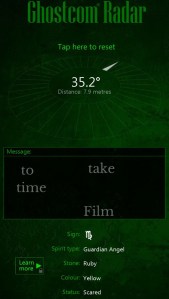
This was a little more “disturbing” than Ghost Radar Legacy but with a similar premise. Spooky music and sound effects, and also a more precise direction and distance given for the “presence detected.” Every presence detected had a star sign, spirit type, stone, colour, and emotional status, and a random message appeared from the presence before I tapped to reset. An explanation of the presence’s stats is only available if you pay for the pro version.
According to the app description, how it works is that a random string of numbers is generated and an algorithm translates it into all of the things displayed on the screen. The idea is to “test whether random algorithms may or may not be influenced by forces beyond our current understanding.” The app developers claim to have had “astounding results” which could be found on their (now non-existent) Facebook page.
In the churchyard, I used the directions and distances the app gave me to move towards the “presences” and redetect, and each time it gave me a different one in different directions with different stats.
A “child” spirit was detected near the church entrance, or the crossroads / fork in the path next to it. Its status was “loving” and the message was “Rest much be about realistic how”. I moved to where I guessed it was according to the directions and distance on the radar, and hit reset.
This resulted in another one being detected 6 metres behind me, an unknown type of spirit with a “content” status. It said “time sort Uranus themselves things.” I moved 6 metres to that area and tapped reset, and another entity was detected half a metre up and to my left, a “multiple” spirit with a “hurt” status which said “heart your in Paula you.”
When I moved to that area and tapped reset, no spirits were detected, so I returned to the last area I was in and tried again, and the app appeared to detect some kind of residual animal spirit inside the church with a confused and lost status. The two messages it generated were “keep out for can forces positive we Georgia hear negative” and “anything others could it cause upset to fear right.” Seeing as it said “keep out” and I needed the lav anyway, I left the churchyard and returned later.
GhostTube SLS
4 out of 5 stars
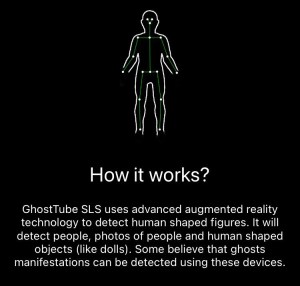
This is best used on a device with an inbuilt LIDAR scanner, but if your phone (like mine) doesn’t have LIDAR, this app can use your phone’s lenses and triangulates using an algorithm to detect humanoid figures and people-like objects. It definitely showed a stick figure on the coats I had hanging up at home, so it works.
In the churchyard, a brief flickering figure was detected on a tree trunk near the crossroads close to the church door, which was where the most consistent “presence” had been detected by the other apps. However, I am inclined to think it was the technology just picking up on the shape of a bumpy ridge in the bark. Other stick figures flickered in and out of vision along parts of architecture on the church and on the edges of gravestones. Nothing unusual.
If you swipe on the screen, it changes the camera filter in a few different ways with different colour tints — I am guessing one of these was supposed to be a thermal imaging filter, but there was no explanation as to what each one was called or what it was for.
You can supposedly record videos of your investigations with it, but when it “saved” the video it was not saved anywhere on my phone. It was only when I went into my profile in the app that I found the saved video, which could be saved to my phone’s photo album from there.
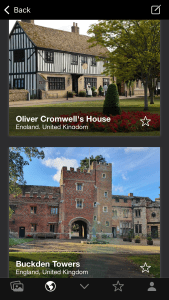
There were links to other GhostTube apps discreetly tucked away in the sidebar, and a tab similar to a social media channel where you could upload photos and statuses of “paranormal” experiences along with a search box that pulls up places of historical interest (which may be haunted) when you search for a location.
There is also a pop-up with a link to the GhostTube YouTube channel [which is actually called Amy’s Crypt] which I didn’t realise was a thing until trying out the app, so at least it’s generating extra awareness of the channel.
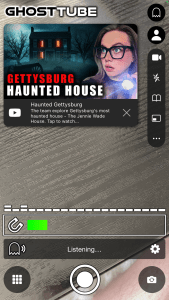
Subscription to the pro version is £2.99 a month or £11.99 a year.
Multiple Functions
GhostTube
3 out of 5 stars
This is an app that combines an EMF reading, with a visual representation of audio signals received by the phone, and a spirit box (or voice that says arbitrary words and short phrases).
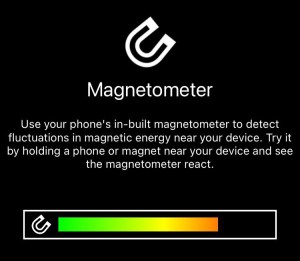
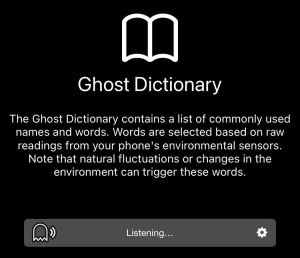
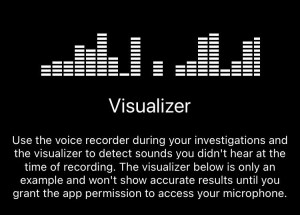
In the privacy of my flat, the voice said “Close it” then “possessed” followed by “I see you” several minutes later, and much later “Nancy” and “Are you frightened?”
In the churchyard there were no EMF spikes but the words “Tell the truth,” “blood,” “can you see?” and “move out of my way” then “it’s not for you” and “I’m confused” was picked up near the three side-by-side gravestones.
As I walked away and stopped by the area where the “content” spirit supposedly was (according to Ghostcom Radar), the app popped up with “Do you want it?” and “shovel.”
Close to the churchyard wall, I got “lady,” and “I don’t understand.”
In the stronger-presence area near the church entrance / crossroads I got “I’m right here,” “I want to stay,” and “I meant it” then “he told me.” After I put my hood down (it had been raining) I got “your hair.”
This app had a very similar layout to the other GhostTube app I reviewed above, with the same filters you can swipe between.
You can either have the app say the words in a normal / robotic voice or a “creepy voice.” To change it to any other voice, add your own words to the ghost box “dictionary”, or get it to keep a log of more than 15 utterances at a time, you have to pay for a subscription of £2.99 a month or £11.99 a year.
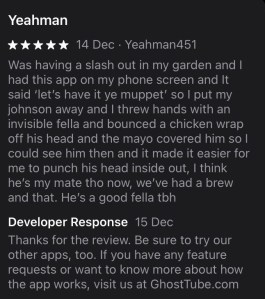
Can we just take a moment to read this excellent review (not left by me, I hasten to add):
Ghost Hunting Tools – Detector
2 out of 5 stars
This one had similar functions to the previous app, only the words from “beyond the veil” would only appear if the EMF signal was strong enough. It had some nice sound effects — fuzzy static and beeping.
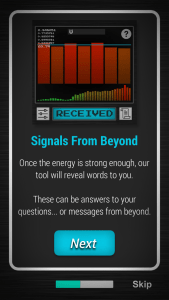
The EMF meter wasn’t as precise or sensitive with this app — magnets did not set it off — and there were sudden pop-up ads which were a pain to close out of.
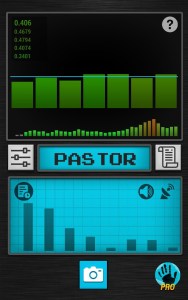
Holding my phone to my vacuum cleaner resulted in the word “pastor” and “pleasant.”
My fridge generated the phrase “so sorry.”
My washing machine said “exercise.” How rude.
My oven said “voting.”
My fusebox said “age”
My fascia gun said “emphasize.”
The remote control said “Pie.”
Then a random EMF spike happened between my living room and kitchen with the word “Understand,” though by that stage I really didn’t.
In the churchyard, near the church entrance crossroads there was a small EMF spike and “station,” “record.” Then another spike, “crowd,” “square,” and “current.”
Close to a side door, as I was looking at the trees I received “wood” and as I walked along the path I got “ourselves,” “author” and “reserve” with a very long-lasting EMF spike. As a couple of people walked past, the signal dropped to almost nothing.
Nothing was detected next to the three graves or the area near the “content” spirit. All I did was annoy a squirrel.
The pro version of this app is £4.99 a month or £24.99 a year to get rid of ads, add words to the ghost box dictionary, and access the full 9000+ word dictionary.
Communication
Ghost Voice Box (spirit box)
1 out of 5 stars
There wasn’t much to this app, to be honest. The design of it was interesting in an olde worlde radio sort of way with a slider at the top that purportedly allows you to scroll through different radio frequencies to capture EVPs, and an EMF dial below that. There were no instructions and nothing audible or comprehensible came through. It didn’t react to magnets or any electrical appliances in my flat.
Nothing comprehensive was uttered in the churchyard either and the EMF needle kept going up and down at random. It went up a bit higher near the church door crossroads.
Ghost Talker – Spirit Chat Box
2 out of 5 stars
This one had a 12000+ library of words, but a limit on how many words could be “spoken” out loud in the free version.
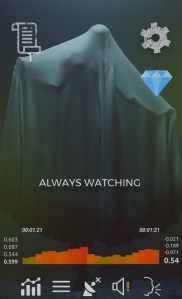
The EMF sensor was very weak. I got messages such as “Always watching” and “Now darkness” then “whoever” with a little stutter followed by “sea.” The EMF meter was slow to react, but it did respond to magnets when held close to the phone.
In the churchyard, close to the crossroads near the church entrance, the app detected “fascinating, fascinating,” “smile,” and as I walked away, “hotel.” and “a threat,” “among…” then my phone died.
Next week, I will be looking at Carl Jung’s theories about ghosts and the Collective Unconscious.
 Nightwalks
well, what type did the ghost application used????
LikeLike
You need to try the new GhostLink app. It has some groundbreaking features no other paranormal investigation app has. https://play.google.com/store/apps/details?id=com.ghostapp.ghostlink
LikeLike
Ah, thank you for the recommendation!
LikeLike